
Contents
- Executive Summary
- Why AI Response Summary Matters for Learning Teams
- 1. Open-Ended Responses Provide Valuable Insight, But Analyzing Them Manually Does not Scale
- 2. AI Response Summary Helps Identify Themes, Patterns, and Sentiment Across Responses
- 3. Learning Teams Remain in Control of When and Where Summaries are Generated
- 4. Sentiment Analysis and Export Capabilities Support Reporting and Program Evaluation
- 5. AI Response Summary Supports Human Analysis Rather than Replacing It
- How to Get Started
Executive Summary
Open-ended feedback plays a critical role in understanding learner experience, but analyzing written responses manually can slow the process of turning feedback into action.
AI Response Summary helps learning teams:
- Organize open-text responses
- Identify themes and sentiment
- Share insights more efficiently
- Reduce the amount of time required to analyze feedback, allowing learning teams to focus more on improving programs and supporting learners.
Why AI Response Summary Matters for Learning Teams
Open-ended questions are one of the most powerful tools available to learning and development teams. They allow learners to share detailed feedback, explain their reasoning, and surface insights that structured question types cannot capture. Whether used in training evaluations, internal surveys, or program assessments, open-text responses often provide the clearest picture of learner experience.
That’s where CredSpark’s AI Response Summary comes in. This feature was developed to help learning teams analyze open-text responses more efficiently. Read on to learn how the feature works, when to use it, and how it supports the understanding of learner feedback at scale.
Below are five key takeaways from a recent discussion with CredSpark’s Product and Customer Success teams.
1. Open-ended responses provide valuable insight, but analyzing them manually does not scale
Open-text responses often contain the most actionable feedback in a learning program. They allow learners to explain what helped them, what confused them, and what could be improved. This type of feedback helps learning teams understand both outcomes and the learner experience.
At the same time, open-ended feedback introduces a practical challenge. 212 organizations deploy 25,352 open text questions across their L&D programs. This accounts for 2.9 million responses, making manually reviewing and analyzing them difficult to sustain. Many teams export responses into spreadsheets and attempt to identify patterns manually, which slows the feedback cycle and makes it harder to act on insights quickly.
“Clients like to use open text questions. And they often provide really great insights, but it’s very time-consuming to analyze that.” — Indre Kurkulyte-Beydoun, Senior Product Manager, while discussing the time efficiency benefits of using open-text summary features.
2. AI Response Summary helps identify themes, patterns, and sentiment across responses
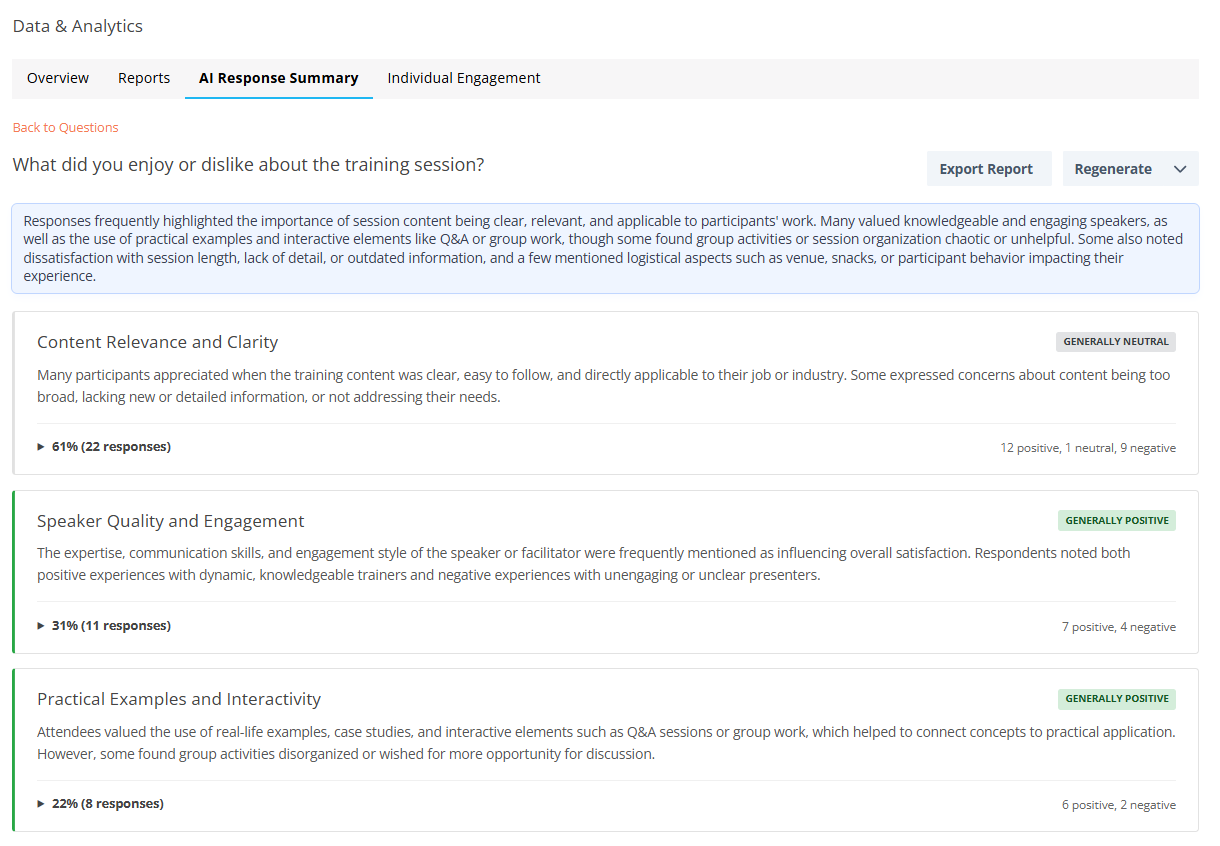
AI Response Summary analyzes written responses and organizes them into structured summaries. Instead of reviewing answers one by one, for hundreds or thousands of responses, learning teams can quickly see recurring themes, common concerns, and overall sentiment.
This helps answer the most common questions:
- What about this course was most helpful to you?
- Please provide any comments about what the instructor did well.
- Please provide any comments about what the instructor could have done better.
- How do you think this learning activity contributes to your development
By organizing responses into themes and highlighting representative feedback, the feature helps learning teams understand what learners are saying more efficiently.
3. Learning teams remain in control of when and where summaries are generated
AI Response Summary is designed to be used intentionally. Administrators first enable the feature at the organizational level, and summaries are generated at the individual question level when users choose to do so.
This ensures that summaries are created only where they are meaningful and useful. The feature also requires a minimum number of responses before generating a summary, which helps ensure that insights reflect patterns rather than isolated responses.
This approach allows learning teams to focus analysis on high-impact questions, such as training feedback or program evaluation questions, while maintaining full control over how AI is applied.
Read about some of CredSpark’s last AI best practices and features here. If you’re interested in trying this feature out, contact: support@credspark.com.
4. Sentiment analysis and export capabilities support reporting and program evaluation

In addition to identifying themes, AI Response Summary includes optional sentiment analysis. This helps learning teams understand the tone of responses, such as whether feedback is generally positive, neutral, or focused on improvement. This feature is frequently used when evaluating training sessions, identifying areas for refinement, or tracking changes in learner experience over time.
Summaries can also be exported as PDF or CSV files, making it easier to share insights with stakeholders, leadership teams, or program owners. This supports reporting workflows and helps ensure that learner feedback informs decision-making.
“You can export these views. You can export as PDF, you can export as CSV. That makes it really easy to share, especially for users doing high-level reporting or training-specific reporting.” — Emily Justin-Szopinski, Customer Success Manager
5. AI Response Summary supports human analysis rather than replacing it
AI Response Summary is designed to accelerate analysis, not replace human judgment. The feature helps identify patterns and organize feedback, but learning teams remain responsible for interpreting results and applying insights.
This ensures that analysis benefits from both AI efficiency and human context. Learning professionals can use summaries to identify patterns quickly, then review individual responses when deeper context is needed.
This balance allows AI to reduce manual workload while preserving the role of human expertise in learning evaluation and improvement.
“This feature is designed to support human analysis, not replace it. It helps to surface patterns and insights quickly, but clients can and should always review the original responses for additional context.” — Indre Kurkulyte-Beydoun, Senior Product Manager
How to Get Started
- Contact support@credspark.com to enable AI Response Summary at the admin level so you can try the tool out. (CredSpark+)
- Generate summaries at the individual question level for open-ended questions where understanding themes and feedback would be most useful.
- Wait until at least 10 responses have been collected before generating a summary to ensure meaningful analysis.
- Use sentiment analysis selectively for feedback questions where understanding tone and learner perception is important.
- Export summaries as PDF or CSV to share insights and support reporting, while reviewing original responses when additional context is needed.
Want to talk through your implementation strategy or or see more examples of these practices in action? Contact us with questions at support@credspark.com.